1. How do you find out what’s your shell? – echo $SHELL
2. What’s the command to find out today’s date? – date
3. What’s the command to find out users on the system? – who
4. How do you find out the current directory you’re in? – pwd
5. How do you remove a file? – rm
6. How do you remove a – rm -rf
7. How do you find out your own username? – whoami
8. How do you send a mail message to somebody? – mail somebody@techinterviews.com -s ‘Your subject’ -c ‘cc@techinterviews.com‘
9. How do you count words, lines and characters in a file? – wc
10. How do you search for a string inside a given file? – grep string filename
11. How do you search for a string inside a directory? – grep string *
12. How do you search for a string in a directory with the subdirectories recursed? – grep -r string *
13. What are PIDs? – They are process IDs given to processes. A PID can vary from 0 to 65535.
14. How do you list currently running process? – ps
15. How do you stop a process? – kill pid
16. How do you find out about all running processes? – ps -ag
17. How do you stop all the processes, except the shell window? – kill 0
18. How do you fire a process in the background? – ./process-name &
19. How do you refer to the arguments passed to a shell script? – $1, $2 and so on. $0 is your script name.
20. What’s the conditional statement in shell scripting? – if {condition} then … fi
21. How do you do number comparison in shell scripts? – -eq, -ne, -lt, -le, -gt, -ge
22. How do you test for file properties in shell scripts? – -s filename tells you if the file is not empty, -f filename tells you whether the argument is a file, and not a directory, -d filename tests if the argument is a directory, and not a file, -w filename tests for writeability, -r filename tests for readability, -x filename tests for executability
23. How do you do Boolean logic operators in shell scripting? – ! tests for logical not, -a tests for logical and, and -o tests for logical or.
24. How do you find out the number of arguments passed to the shell script? – $#
25. What’s a way to do multilevel if-else’s in shell scripting? – if {condition} then {statement} elif {condition} {statement} fi
26. How do you write a for loop in shell? – for {variable name} in {list} do {statement} done
27. How do you write a while loop in shell? – while {condition} do {statement} done
28. How does a case statement look in shell scripts? – case {variable} in {possible-value-1}) {statement};; {possible-value-2}) {statement};; esac
29. How do you read keyboard input in shell scripts? – read {variable-name}
30. How do you define a function in a shell script? – function-name() { #some code here return }
31. How does getopts command work? – The parameters to your script can be passed as -n 15 -x 20. Inside the script, you can iterate through the getopts array as while getopts n:x option, and the variable $option contains the value of the entered option.
Showing posts with label Linux Notes. Show all posts
Showing posts with label Linux Notes. Show all posts
Tuesday, November 16, 2010
Basic shell scripting questions
Tuesday, November 16, 2010Labels: Linux Notes, Scripting 19 comments

Friday, October 29, 2010
To check Linux page I/P and page O/P errors
Friday, October 29, 2010
There are few commands to check the Page i/p and page o/p errors in Linux m/c.
$ getconf PAGESIZE
OR
$ getconf PAGE_SIZE
Output:
4096
- vmstat -s // this command will list the page i/p and o/p values at one time. No option for regular interval.
- sar -B 1 5 // this will display you the page values at regular intervals which you mentioned the delay.
- iostat 1 5 // this will aslo display you the page values at regular intervals which you mentioned the delay.
$ getconf PAGESIZE
OR
$ getconf PAGE_SIZE
Output:
4096
Labels: Linux Notes 0 comments
Thursday, September 23, 2010
GOOGLE PRE-SCREEN TEST!!
Thursday, September 23, 2010
Below are the few questions which I was asked by GOOGLE pre-screen test. hope it should be helpful.
TCP/IP
TCP/IP
- How many bytes in a MAC address?
- Which protocol is used by PING command?
- How many hosts are available in /23 subnet?
- What is the purpose for setting STICKY BIT on directories?
- What is the default signal send by KILL command?
- Which UNIX part is taken care of storing files information in INODE?
Labels: Interview, Linux Notes 0 comments
Sunday, August 29, 2010
Procedure to mount remote windows partition (NAS share) on Linux
Sunday, August 29, 2010
Procedure to mount remote windows partition (NAS share) on Linux
1) Make sure you have following information:
==> Windows username and password to access share name
==> Sharename (such as //server/share) or IP address
==> root level access on Linux
2) Login to Linux as a root user (or use su command)
3) Create the required mount point:
# mkdir -p /mnt/ntserver
4) Use the mount command as follows:
# mount -t cifs //ntserver/download -o username=vivek,password=myPassword /mnt/ntserver
1) Make sure you have following information:
==> Windows username and password to access share name
==> Sharename (such as //server/share) or IP address
==> root level access on Linux
2) Login to Linux as a root user (or use su command)
3) Create the required mount point:
# mkdir -p /mnt/ntserver
4) Use the mount command as follows:
# mount -t cifs //ntserver/download -o username=vivek,password=myPassword /mnt/ntserver
Labels: Linux Notes 0 comments
Tuesday, October 28, 2008
Passed RHCE !!!
Tuesday, October 28, 2008
Hi,
I have passed RHCE exam and i have scored 92.9 out 100. Thanks !!!
I have passed RHCE exam and i have scored 92.9 out 100. Thanks !!!
Labels: General, Linux Notes 0 comments
Sunday, September 21, 2008
RHCE Red Hat Certified Engineer Linux Study Guide (Exam RH302) Fifth Edition - Michael Jang
Sunday, September 21, 2008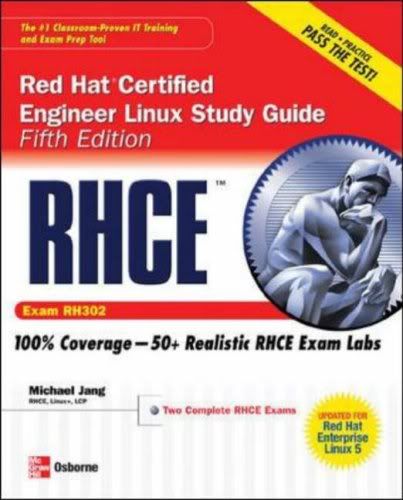
The Best Fully Integrated Study System Available
With hundreds of practice questions and hands-on exercises, RHCE Red Hat Certified Engineer Linux Study Guide, Fifth Edition covers what you need to know--and shows you how to prepare--for this challenging exam.
- 100% complete coverage of all objectives for exam RH302
- Exam Readiness Checklist at the front of the book--you're ready for the exam when all objectives on the list are checked off
- Inside the Exam sections in every chapter highlight key exam topics covered
- Real-world exercises modeled after hands-on exam scenarios
- Two complete lab-based exams simulate the format, tone, topics, and difficulty of the real exam
- Bonus content (available for download) includes installation screen review, basic instructions for using VMware and Xen as testbeds, and paper and pencil versions of the lab exams
Covers all RH302 exam topics, including:
- Hardware installation and configuration
- The boot process
- Linux filesystem administration
- Package management and Kickstart
- User and group administration
- System administration tools
- Kernel services and configuration
- Apache and Squid
- Network file sharing services (NFS, FTP, and Samba)
- Domain Name System (DNS)
- E-mail (servers and clients)
- Extended Internet Services Daemon (xinetd), the Secure package, and DHCP
- The X Window System
- Firewalls, SELinux, and troubleshooting
Pages : 848
 10 MB
10 MB
Labels: E-Books, Linux Notes 4 comments
Friday, September 12, 2008
VSFTPD "500 oops cannot change directory"
Friday, September 12, 2008
Today, I am trying to configure FTP server in my virtual Linux box.After the installation and configuration, am not able to change the directory itself. It displays the message"500 OOPS CANNOT CHANGE DIRECTORY", when i was trying to change the directory.
After searching Google, I found the solution for this. It is pretty simple, I have disabled the SELinux and ran this command
"/usr/bin/setsebool -P ftp_home_dir 1 "
This solved my issue.
After searching Google, I found the solution for this. It is pretty simple, I have disabled the SELinux and ran this command
"/usr/bin/setsebool -P ftp_home_dir 1 "
This solved my issue.
Labels: Linux Notes 0 comments
Tuesday, April 29, 2008
DzSoft Perl Editor 
Tuesday, April 29, 2008
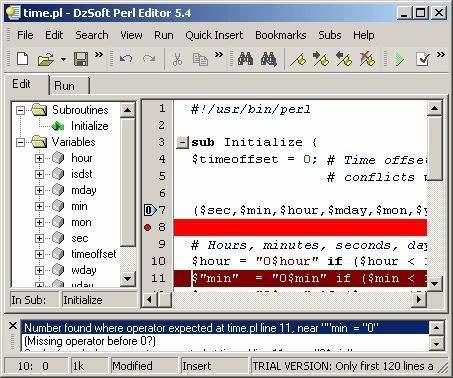
DzSoft Perl Editor is a tool for writing, editing, and debugging Perl/CGI scripts. It has a comfortable and intuitive interface both for beginners and advanced programmers. DzSoft Perl Editor is deceptively simple, but it is really a very powerful tool. It has debugging features, a very comfortable editor with syntax highlighting, a syntax check feature that finds errors in your script, and many other features for easy and comfortable Perl development.
Key Features:
* Customizable Syntax Highlighting
* Run the script and see the result immediately in the internal browser without a web server
* Syntax Check
* Collapsible subroutines
* Customizable code snippets
* Full server simulation
* Full control of the environment variables and input data
* Code Explorer
* Can upload the script to FTP
* HTML export and print with syntax highlighting
* Super comfortable editor with savable bookmarks
* SDI interface that supports multiple instances
* Windows/Unix/Mac line breaks formats support
* OfficeXP-styled menus and toolbars
* "Run in Command Prompt" feature (with debugging)
* Built-in POD viewer with automatic detection
18 MB
Note : Mail me for RAR password
Note : Mail me for RAR password
Labels: Linux Notes, Softwares, Windows Network 0 comments
Thursday, February 21, 2008
Compression and Archive using TAR
Thursday, February 21, 2008
Different types of compression using the TAR command
[root@linux ~]# tar -cvf /tmp/etc.tar /etc  <==archive only,not compress
[root@linux ~]# tar -zcvf /tmp/etc.tar.gz /etc  <==archive&compress(gzip)
[root@linux ~]# tar -jcvf /tmp/etc.tar.bz2 /etc <==archive&compress(bzip2)
Labels: Linux Notes 0 comments
Tuesday, April 3, 2007
Linux - View hidden files in graphical mode
Tuesday, April 3, 2007To see hidden files in graphical mode in Linux
=> open the file browser from view menu select the option show hidden files or ( CTRL + H ), u can see the hidden files.
Labels: Linux Notes 0 comments
Subscribe to:
Posts (Atom)


